
Fuji Xerox Print&Scan (S)1.2.1 - Google Play
You'll be able to see results in few seconds.
Publisher Description
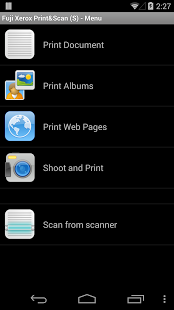
Fuji Xerox Print & Scan Utility (Small Office) for Android is a free print and scan application for Android devices. You can print from AndroidTM applications, PDF documents, Web pages, photos saved in your device or taken by the internal camera.
For more details, please visit Fuji Xerox web site:
http://www.fujixerox.co.jp/product/software/printutility_so_and/
Key Features
-Printing from applications
- Printing Web page: Printing cost can be reduced by using multiple-up printing.
- Printing stored photos: 4-up printing and thumbnail image printing are also available. A preview function allows viewing of print images before printing.
- Printing captured photo: You can print photos captured by your device's camera. You are able to adjust the selected paper size automatically.
- Printing PDF documents.
- Scan and store a document with JPEG or PDF file formats in your Android devices. (*1)
(*1) Scanning is available on Color Multifunction printers. (See below.)
System Requirements
- Compatible models should be used.
- Your Android devices should be connected to the wireless LAN network
- Port9100 should be enabled on your printer
- Bonjour should be enabled to automatically detect printers.
Supported Languages
- English, Korean, Simplified Chinese, Traditional Chinese, Thai, Japanese
Tested Devices and OS Versions
- NEC LifeTouch L (AndroidTM 4.1)
- SONY Xperia A (AndroidTM 4.1)
- Galaxy S4 SC-04E (AndroidTM 4.2)
- HTC One (AndroidTM 4.3)
- Nexus5 (AndroidTM 4.4)
- Nexus7 (AndroidTM 4.4)
- Moto X (AndroidTM 4.4)
Compatible Models
For customers in Asia Pacific excluding Japan:
Color Multifunction printer: DocuPrint CM205 fw, DocuPrint CM 205 f, DocuPrint CM215 f, DocuPrint CM 215 fw
Color printer: DocuPrint CP205 w, DocuPrint CP205, DocuPrint CP215 w, DocuPrint CP 215
Monochrome Multifunction printer: DocuPrint M115 w, DocuPrint M118 w, DocuPrint M115 fw, DocuPrint M115 z,
DocuPrint M118 z
Monochrome printer: DocuPrint P115 w, DocuPrint P118 w
For customers in Japan:
Color Multifunction printer: DocuPrint CM200 fw, NEC MultiWriter 5650F
Color printer: DocuPrint CP200 w, NEC MultiWriter 5650C
About Fuji Xerox Print&Scan (S)
The company that develops Fuji Xerox Print&Scan (S) is Fuji Xerox Co., Ltd.. The latest version released by its developer is 1.2.1.
To install Fuji Xerox Print&Scan (S) on your Android device, just click the green Continue To App button above to start the installation process. The app is listed on our website since 2014-11-03 and was downloaded 0 times. We have already checked if the download link is safe, however for your own protection we recommend that you scan the downloaded app with your antivirus. Your antivirus may detect the Fuji Xerox Print&Scan (S) as malware if the download link to jp.co.fujixerox.prt.PrintUtil.Karin is broken.
How to install Fuji Xerox Print&Scan (S) on your Android device:
- Click on the Continue To App button on our website. This will redirect you to Google Play.
- Once the Fuji Xerox Print&Scan (S) is shown in the Google Play listing of your Android device, you can start its download and installation. Tap on the Install button located below the search bar and to the right of the app icon.
- A pop-up window with the permissions required by Fuji Xerox Print&Scan (S) will be shown. Click on Accept to continue the process.
- Fuji Xerox Print&Scan (S) will be downloaded onto your device, displaying a progress. Once the download completes, the installation will start and you'll get a notification after the installation is finished.
Program Details
System requirements
Download information
Pricing
Version History
version 1.2.1
posted on 2014-11-03
version 1.1.0
posted on 2012-10-05
Several fixes and updates
Disclaimer
Official Google Play Link
We do not host Fuji Xerox Print&Scan (S) on our servers. We did not scan it for viruses, adware, spyware or other type of malware. This app is hosted by Google and passed their terms and conditions to be listed there. We recommend caution when installing it.
The Google Play link for Fuji Xerox Print&Scan (S) is provided to you by apps112.com without any warranties, representations or guarantees of any kind, so access it at your own risk.
If you have questions regarding this particular app contact the publisher directly. For questions about the functionalities of apps112.com contact us.
